Building a Weather App using Node.js

Hey, I am Shalini Muskula, an undergrad student learning Web Development. I recently started contributing to Open Source. I will be focusing on Web development and DSA in my blogs.
Overview
In this tutorial, we'll learn how to create a weather application where you can know the weather of the city you enter using Node.js. We will use HTTP server to get requests. The API we will be using is OpenWeather.
Prerequisites
Before we dive in, we need a few things:
Node.js is installed on your machine.
An API key from OpenWeatherMap. You can sign up for a free API Key here.
How to use OpenWeather API?

You would see something similar to this when you open their site. Choose the API doc of Current Weather Data since we need the current conditions in a city. Going through the documentation is really important. You will find the required API call under Built-in geocoding.

The first API call gives the data based on the city name. If you were to scroll down a bit further you will see the parameters.
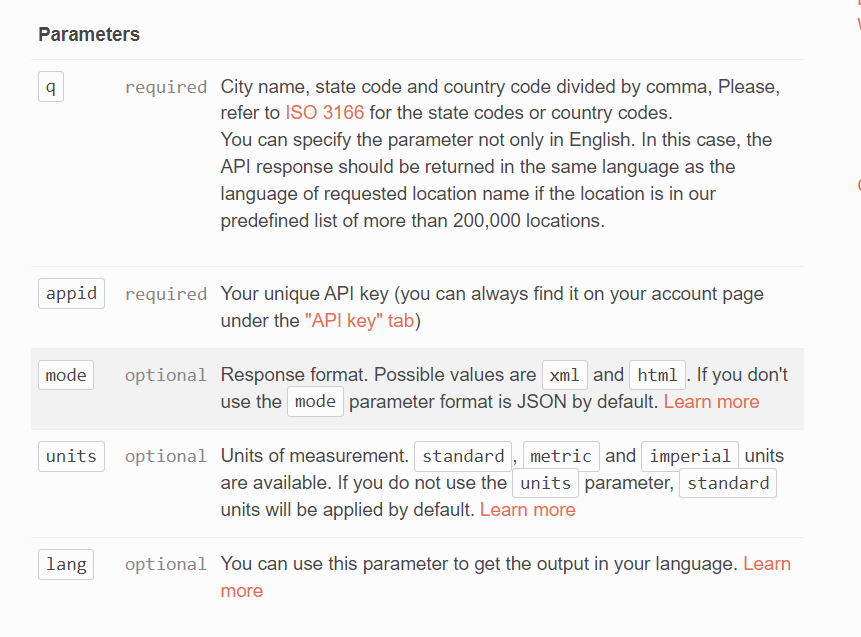
The standard unit is kelvin, so if you need the temperature in celsius add the units in the URL of the API call. You can use postman to avoid any errors.
Your URL should be like this :
https://api.openweathermap.org/data/2.5/weather?q={cityname}&appid={API key}&units=metric
Step 1: Setting up the project
To create a new Node.js project, run the command npm init in your project directory. Follow the prompts to configure your project in VS Code.
Step 2: Installing dependencies
We'll be using HTTPSto make HTTP requests to the OpenWeatherMap API and express, body-parser to parse the data. Type the following commands in the terminal:
npm install express
npm install body-parser
Step 3: Creating the app.js file
Create a new file called app.js in your project directory. This will be the entry point of our application. Create another file called index.html.
Step 4: Setting up
In the app.js file, require express, body-parser, https at the top of the file:
const express = require('express')
const https = require('https')
const bodyParser = require('body-parser')

const app = express()
Copy
Next, we will be sending our index.html file as a response to the get request from the homepage. response.sendFile({path}) is used to send files as a response.
'/' -> indicates that we are on our homepage
__dirname gives the address of the directory
app.use(bodyParser.urlencoded({extended:true}))
app.get('/', (req, res) => {
    res.sendFile(__dirname + "/index.html")
})
Copy
Step 5: Getting the post request
We will be creating a form in index.html file, which on submission sends the form data to our app.js via a post request.You can add bootstrap to style your webpage.
action = '/' suggests that we are sending from the homepage
method = 'post' suggests that we are sending a post request.
<form action="/" method="post" class="mt-5  text-center">
        <input type="text" name = "cityname" placeholder="  Enter city name" class="mt-5 input-group bg-dark-subtle p-1 rounded-2" >
        <button type="submit" class="btn btn-primary mt-5">submit</button>
 </form>
Step 5: Fetching data from the form
Now that we have created the form, we can take the city name as input from the user.
app.post('/',(req,res)=>{
    const cityname = req.body.cityname;
Copy
Step 6: Fetching data from the API
Now that we have the cityname from the user, we can use https to fetch weather data from the OpenWeatherMap API:
const apikey = "{YOUR_API_KEY}"
https.get("https://api.openweathermap.org/data/2.5/weather?q="+cityname+"&appid="+apikey+"&units=metric",(response) =>{
        response.on('data',(data)=>{
        const weatherapp =JSON.parse(data)
        const temp = weatherapp.main.temp
        const mintemp = weatherapp.main.temp_min
        const maxtemp = weatherapp.main.temp_max
        const pressure = weatherapp.main.pressure
        const humidity = weatherapp.main.humidity
        const desc = weatherapp.weather[0].description
        const icon = weatherapp.weather[0].icon
        const iconurl = 'https://openweathermap.org/img/wn/' + icon + '@2x.png';
Replace {YOUR_API_KEY} with your API Key from OpenWeatherMap.
Step 7: Sending data to the homepage
res.write("<h1>The temp in " + cityname + " is " + temp + " degree celcius</h1>")
        res.write("<h2> min temp : "+mintemp+"</h2>")
        res.write("<h2> max temp : " + maxtemp + "</h2>")
        res.write("<h2> pressure : " + pressure + "</h2>")
        res.write("<h2> humidity : " + humidity + "</h2>")
        res.write("<h2> " + desc + "</h2>")
        res.write("<img src = " + iconurl + ">")
        res.send()})
    })

})
app.listen(3000, () => console.log(`Example app listening on port 3000!`))
Test the application by running nodemon app.js in the terminal.
Conclusion
That's it! You now have a simple weather app built on Node.js.
You can find the code here:
Shalini469717/WeatherApp: Gives the weather of your city (github.com)
Hope you enjoyed reading the blog. I'd love to hear from you: Did I leave anything out? Any suggestions to improve? What other topics should I write a blog on? Comment below and let me know.


